Debugging GPU Memory Access
This blog contains a lot of content, and i don't feel like splitting it into multiple parts, it might be a bit long, there will be a TL;DR at the end
What's now?
If you have been following my previous blogs, you will know i am building pomelo, an open source alternative to the stock homemenu. And since the homemenu, is a pretty critical part of the 3ds console, it's kinda harsh.
In the previous 3 blogs, i was talking about a low level issue. When a 3ds process starts, it requests from the kernel a memory region it can use as heap, and one it can use as linear heap - heap for storing textures and GPU stuff. The unique part about linear heap, is that it's continous in the physical memory as well. This is very important when storing buffers that the GPU will access, as the GPU doesn't have an MMU and works mostly with physical addresses.
For regular apps, libctru (open source 3ds SDK) just takes care of it, but when you are building a homemenu, it's not that simple...
After i fixed the linear heap allocation, i started having other issues, in mikage everything was working just fine. However on real hardware, the rendering failed and after some basic debugging, it's seems like the rendering process simply hangs :(
3ds GPU Rendering Process
Before we talk about what is the issue that i experienced with pomelo, we need to learn a bit about the 3ds rendering process.
The 3ds has the PICA200 GPU that we will be talking about today. And a sysmodule called the GSP module that acts as a driver for communicating with the GPU.
We also have citro3d, which is a usermode sdk, meaning the it's part of the app that wants to render stuff, that we will be using as an abstraction layer.
Assuming we have already initialized everything required for rendering, let's look at what happens every frame we render :)
Frame Init
One of the most important parts of the rendering process is the gpuCmdBuffer, it contains all the render instructions for the GPU, including textures to render, text, vectors (lines, rectangles). It also includes the physical addresses that point to the location of these textures, vectors in physical memory. Again, the GPU doesn't really know what virtaul memory is.
The gpuCmdBuffer is initialized by citro3d, and allocated in the linear heap of pomele, you should already know what is a linear heap from the previous blog :)
We start by zeroing out the gpuCmdBuffer, as we don't want any garbage or leftovers in that buffer.
Adding Textures and Vectors
Now is the time for us to get creative :)
Pomelo now can draw the background, draw the game icons, add the game name and publisher to the frame, basically all the interesting stuff. All these actions are transformed into commands that are added to the command buffer. They are not actually rendered, only stored in a temporary buffer, waiting to be flushed to the GPU.
Frame End
Now is the Interesting part...
After pomelo added all the textures and everything it wants to render, we have a gpuCmdBuffer that is filled with instructions for the GPU to process and make the magic happen.
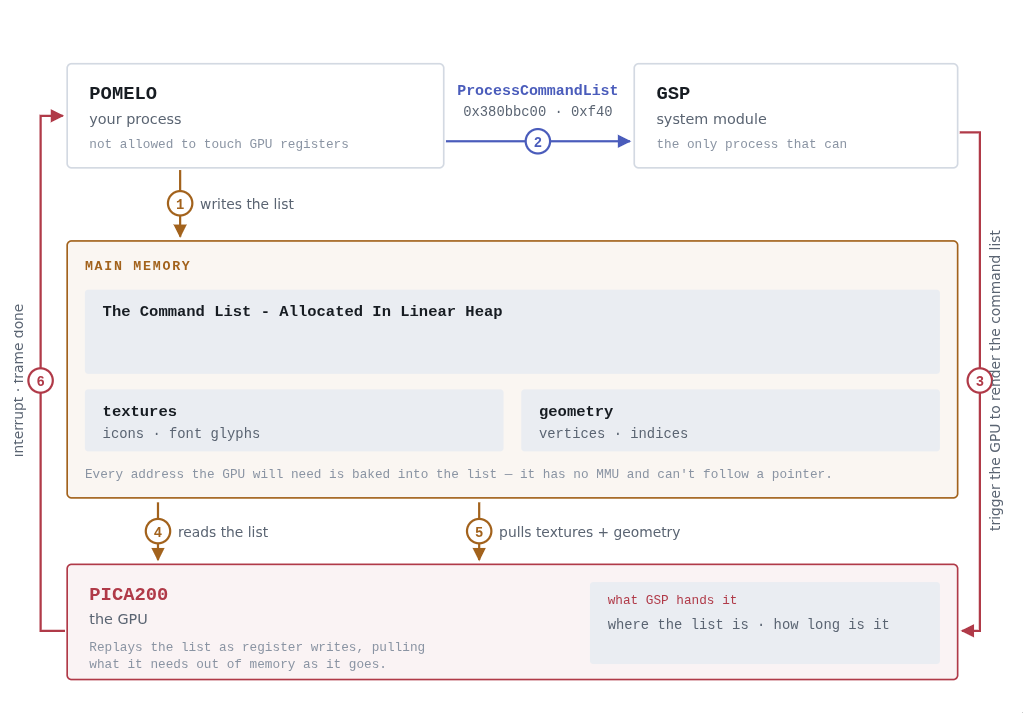
Now there are 3 different calls to the GSP module to do in order to render the frame:
1. MemoryFill
This tells the GPU to clean the VRAM memory. It is used to clear the previous frame before starting to render new stuff on top of it.
2. ProcessCommandList
This call is the most complicated by far, so i want to focus on it a bit more. Also (spoiler alert), this is the call that caused pomelo to hang, we will talk more about it very soon.
It tells the GSP module to render the beautiful gpuCmdBuffer that we have built.
We give the GSP module the Virtual Address of the gpuCmdBuffer and it's size. The GSP module translates this virtual address into a physical address, that the GPU can actually use and access.
Unlike other common operating systems, on the 3ds translating the virtual address to a physical address is fairly easy, in most cases it's simply a hardcoded offset between the two addresses.
Then the GSP module is giving the GPU the physical address of the gpuCmdBuffer and it's size, and the GPU does it's magic.
3. DisplayTransfer
This call tells the GSP module to tell the GPU to start rendering all the processing it just did.
Waiting for a Return Signal
We will know that the GPU finished what the GSP module asked for, by receiving signals from the GPU that indicate it's status. Each such GSP call has a signal of it's own that indicates the action finished:
- PSC0 - Indicates the MemoryFill finished
- P3D - Indicates the ProcessCommandList finished
- PPF - Indicates the DisplayTransfer finished
Once we have received all 3 signals we can be sure that the GPU did it's job and the image should now show up on the console :)
Diagram!
Debugging The Issue
After we transfered Pomelo to use the System region in FCRAM, instead of the APP region, which you can read more about in the previous blogs. I suddenly noticed that pomelo started hanging shortly after booting...
I would get some text on the top screen, but the bottom screen, where i actually rendered textures and pretty stuff, was empty. So i started adding print statements, and i very quickly learned that the part that was hanging pomelo was FrameEnd.
So i continued debugging, and the issue was that we were waiting for a signal that the GPU never sent, but which signal is the missing one?
I printed all the signals and stubbed each of the calls to the GSP module, to identify the GSP call that was causing the hang, and i learned that the culprit was ProcessCommandList.
Virtual Addr to Physical Addr Translation
I wanted to test if the issue could be in the translation between virtual addr to physical addr by the GSP module.
There were some changes to the address of VADDR in kernel version 2.44 of the 3ds kernel, and that was my first suspect.
I did all sorts of random stuff to test it, but the final test was editing the GSP module itself to crash when sending the physical addr to the GPU. The crash would give us the register dump, which would contain the physical addr that was passed to the GPU.
I used claude to find the exact point in the GSP module that we need to replace with svcBreak, and build me a patch file. Because this is a sysmodule and not a regular title, we can't use "Game Patching" like we did in the previous blog, we need to use "sysmodule patching", that works by giving Luma3ds a patch file to patch the real GSP module.
This gave us two crash dumps, one for pomelo, and one for the real homemenu
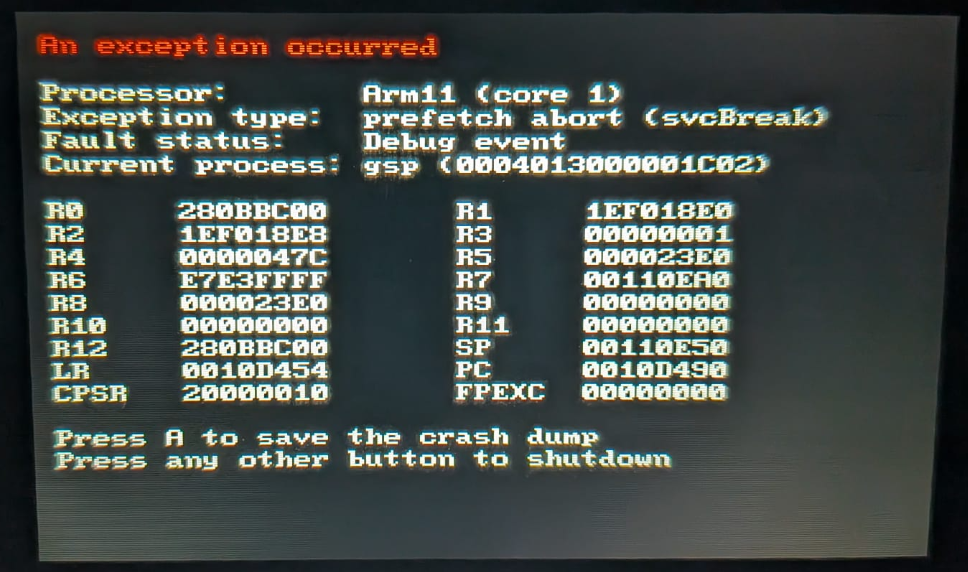
Pomelo GSP Module Crash
Stock Homemenu GSP Module Crash
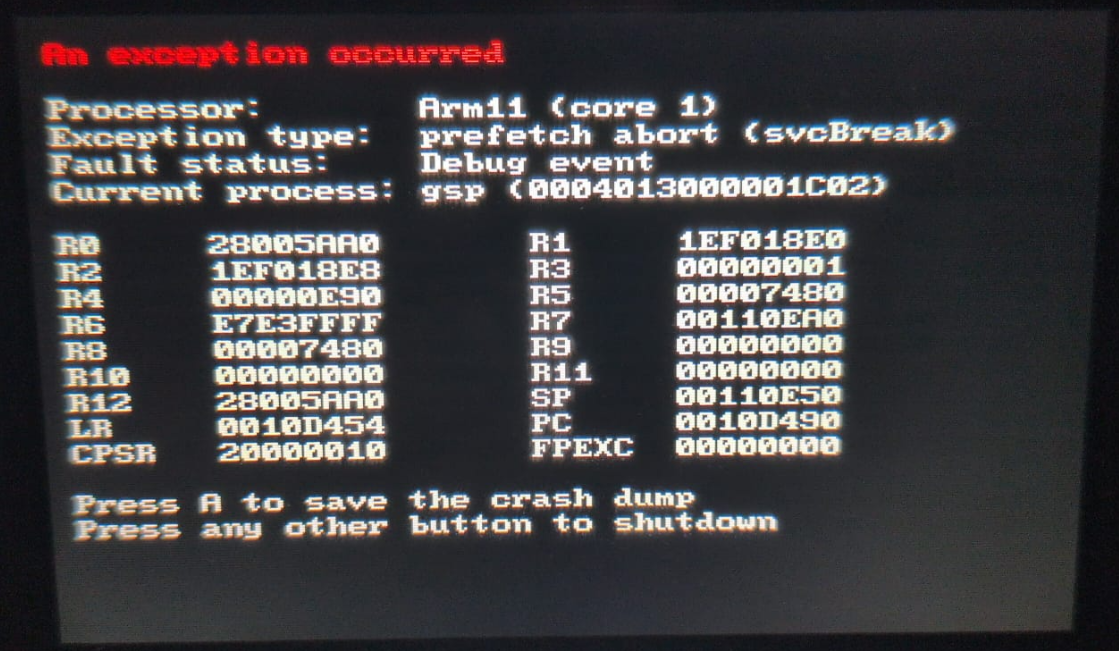
The relevant register is R1, which contains the physical memory (after translation from virtual) of the gpuCmdBuffer that is transfered to the GPU by the GSP module.
As you can see in the crash dumps, the physical address of the buffer that pomelo allocated is 0x280BBC00. The physical address of the stock homemenu buffer is 0x28005AA0.
Hmmmm, it's not that same, but they are in the same region of memory, with a diff of around 0xB0000 bytes (~700KB), it's probably not substantial enough to be the reason for the hang :(
What commands are being passed to the GPU?
I was trying to get claude to fix the hanging GPU issue, not with much success :(
But it did raise an interesting point. He saw i am using the stock font that comes with the console. Claude was thinking that the font was in some shared memory region that could be unreachable to the GPU. I was able to disprove this fairly quickly but this led to an interesting thought.
If the ProcessCommandList call hangs the GPU, the reason could be one of that commands that the GPU tries to process? Maybe one of them tries to access some weird memory region and this hangs the GPU? Maybe one of the textures / vectors / whatever is passed to the GPU, is mapped in some weird memory region, that the GPU cannot access?
There is only one way to find out!
So we dumped the commands from the gpuCmdBuffer by going over the buffer and parsing the commands in the buffer. In practice, they are all GPU Register Writes, as this is how most of the interaction between the GPU and the CPU works, by writing to GPU registers.
One of them popped up right as i dumped the commands from the gpuCmdBuffer, and it was the GPU Register called GPUREG_ATTRIBBUFFERS_LOC
This register is used as a base address for passing addresses of vertex buffer. When we want to point the GPU at the addr of a certain vertex buffer, we only need to give the GPU the offset from the base address, and that way we can save a couple of bytes :)
When the GPU renders vertices (triangles and such, NOT TEXTURES), pomelo is expected to store all the data about the vertices in a buffer in it's own memory, and give the GPU the address of that buffer, which should be allocated in the linear heap. Access to the vertices buffers works by giving the GPU a base address + offset.
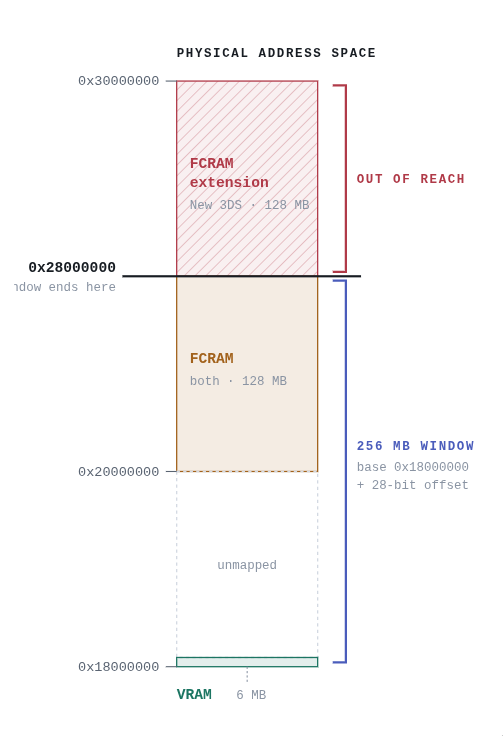
But that is an important BUT - the GPU can only access the first 256MB from the base address, meaning the physical addresses that can be accesses are, base address -> base address + 256MB.
Let's look at the numbers, shall we?
The default base address in citro3d is 0x18000000, The application region of FCRAM starts at 0x20000000, The system region of FCRAM start at 0x28000000
(FCRAM System Region Start) - (Citro3d base address) = 0x28000000 - 0x18000000 = 0x10000000 = Exactly 256MB!Meaning, THE GPU CANNOT ACCESS THE SYSTEM REGION OF FCRAM! The border of the region which the GPU can access is exactly where the System Region of FCRAM starts!
The Fix
The fix is as easy as bumping the value up to 0x20000000, and it fixes the issues. The obvious caveate is that we cannot store the vertices buffer in the address range between 0x18000000 - 0x20000000, now that region doesn't contain FCRAM, it contains VRAM and QTM Memory. I wasn't planning to use them anytime soon (and not really even sure how to do so), but this is something to be aware of.
What This Means For Pomelo?
Now that pomelo is using the SYSTEM region of FCRAM, a lot of games that didn't previously boot, boot just fine now. Even big titles like Mario Kart 7, and the Pokemon games!
This is one of the bigggest challenges i have faced when building Pomelo, and i think it's safe to say that we have solved most of the hard R&D parts in pomelo. Now, what we have left is making it more usable and actually a good UX, with things such as:
- Better shutdown sequence
- Improve the return to menu sequence
- Better UI
- Show system stats
And much more...
TL;DR
- We changed pomelo to use SYSTEM region of FCRAM, instead of APPLICATION region of FCRAM.
- When drawing a frame we give the GPU a vertices buffer that is stored in the linear heap. The access is done by specifying a base address, that is hardcoded in the SDK we are using, and also an offset from the base address.
- The GPU can only access the 256MB of memory after the base address.
- The new SYSTEM region is not part of those 256MB of memory that the GPU can access
- We need to change the value of the base address in the SDK we are using.