Homemenu Memory Shenanigans - Part 1
Why?
While building Pomelo (which you can read more about in my previous blog), i noticed that some games that pomelo tried to boot, would crash very quickly after they started - usually the more serious ones such as the mario and legend of zelda series. I assumed that i didn't initialize / handle something correctly, which caused some games to crash.
One such game was "Super Mario 3D World", so i decided to take this one as an example, and assumed that getting it to boot, should fix the same issues that a lot of games had.
How?
I dumped the game from my console, and put it into ghidra to try and understand why the game was crashing. I would also mention that i got a pretty detailed stack dump from my 3ds console, including the state of all the registers, and the stack.
I loaded the game binary into ghidra, and used the modern marvel of Artificial Intelligence to my help. I connected claude code to the ghidra MCP server, gave it the crash dump, and very quickly it gave me the answer i was looking for. The reason "Super Mario 3D World" was crashing, when the game boots, it checks how much RAM is has available for use, and if it doesn't have enough, it crashes :(
But in that case, how does the game boot at all? After all pomelo uses much less memory than the stock homemenu, so what is the issue? And that's when i learned about 3ds FCRAM memory regions.
FCRAM Memory Regions
As you can see in this super useful diagram, the 3ds FCRAM is where the heaps of all the different processes in the 3ds are allocated. The FCRAM is split into 3 sections:
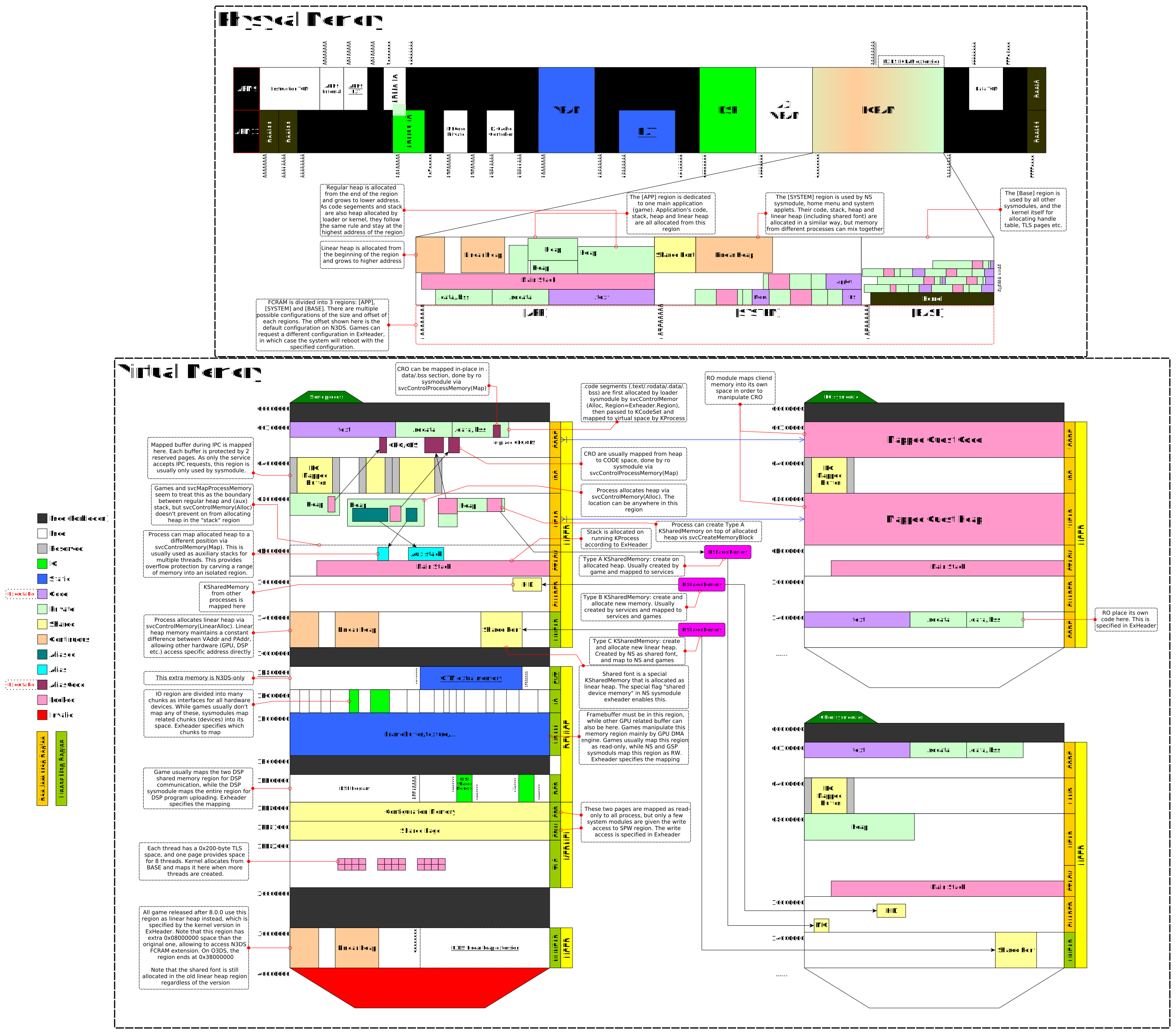
- APPLICATION - For Games and Applications running on the 3ds system, such as "Mario Kart 7", "Super Mario 3D World" and etc...
- BASE - Used by some of the sysmodules, and also the kernel itself.
- SYSTEM - Used by the NS module, some system applets (system apps such as camera or settings menu), and most importantly the homemenu is using this section
AHA!
The memory region that the title is using, is defined by the title itself. Titles will usually use the APPLICATION system region, and since titles are signed by Nintendo, this is not something that the author of the app can change. However on modded consoles, we can practically do whatever we want.
In the case of pomelo, it is using the APPLICATION memory region, as you can see defined in the template.rsf file that is used the build the CXI section
MemoryType: ApplicationAHA! Now everything makes sense! Because Pomelo is using the APPLICATION system region, it's using some of the memory that is reserved for actual 3ds games, and when "Super Mario 3D World" is booting, it doesn't have the amount of memory that it expected.
So the fix should be as simple as changing that to SYSTEM, right? Sadly, it's not that simple..
Something is crashing :(
Re-building Pomelo and running it on my modded console, i immediately got a crash :(
The crash dump we got looked like this. As you can see we can see the state of each register, we also have the state of the stack in the bottom screen, however that is not relevant at the moment.
The first interesting thing you can see here, is that the Exception Type is svcBreak, which is a syscall that has a single purpose - crash the system.
This means that some code somewhere, reached a state where it just couldn't continue and had no other choice, but to crash.
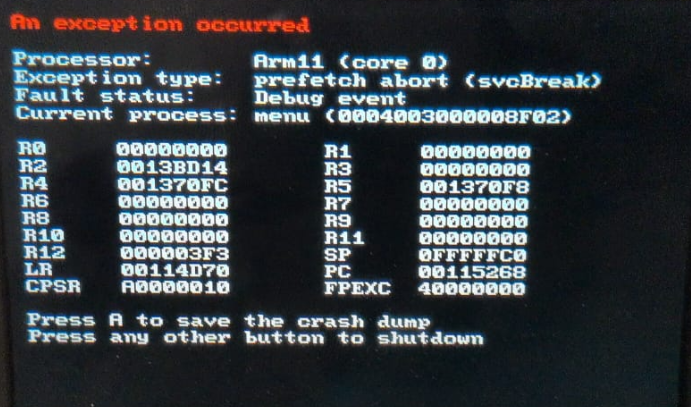
The PC register pointed to the svcBreak function, luckily we can use the LR register to see which function called svcBreak,
The LR function pointed to a function called __system_allocateHeaps.
The function __system_allocateHeaps is a function that runs at a very early stage of the title boot, even before the main function is executed.
It kinda makes sense that by playing with the memory region in which the heap is allocated, we broke something related to heap allocations. Let's dig into this function and understand which specific section is crashing!
The relevant function looked something like this
// Retrieve handle to the resource limit object for our process
Handle reslimit = 0;
rc = svcGetResourceLimit(&reslimit, CUR_PROCESS_HANDLE);
if (R_FAILED(rc))
	svcBreak(USERBREAK_PANIC);

// Retrieve information about total/used memory
// and calculate how much memory we can allocate
// ...

// Allocate the application heap
rc = svcControlMemory(
	&__ctru_heap,
	OS_HEAP_AREA_BEGIN, 0x0,
	__ctru_heap_size,
	MEMOP_ALLOC, MEMPERM_READ | MEMPERM_WRITE
);

if (R_FAILED(rc))
	svcBreak(USERBREAK_PANIC);

// Allocate the linear heap
rc = svcControlMemory(
	&__ctru_linear_heap,
	0x0, 0x0,
	__ctru_linear_heap_size,
	MEMOP_ALLOC_LINEAR,
	MEMPERM_READ | MEMPERM_WRITE
);

if (R_FAILED(rc))
	svcBreak(USERBREAK_PANIC);
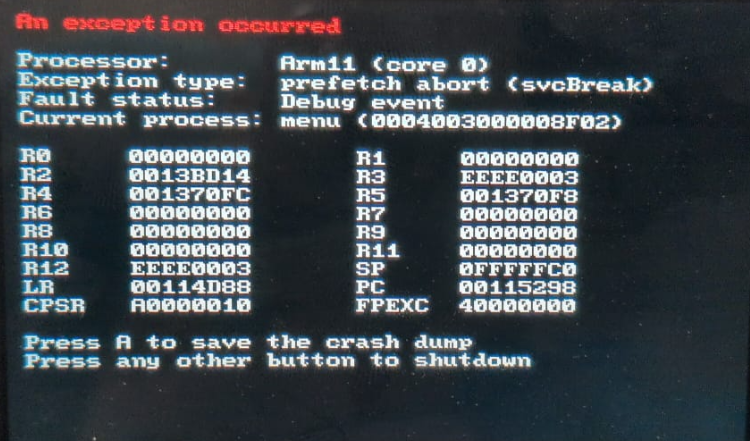
As you can see, we have 3 svcBreak calls in this function, but how can we know which one is the relevant one? I used R12 as an error code register, in which i set a hardcoded value, just before the call to svcBreak. As svcBreak doesn't really change the value of the registers, that value would later show up in the register state dump i get when the console crashes.
The updated code looked something like this
// Retrieve handle to the resource limit object for our process
Handle reslimit = 0;
rc = svcGetResourceLimit(&reslimit, CUR_PROCESS_HANDLE);
if (R_FAILED(rc)) {
	asm volatile("mov r12, %0" : : "r"(0xEEEE0001));
	svcBreak(USERBREAK_PANIC);
}

// Retrieve information about total/used memory
// and calculate how much memory we can allocate
// ...

// Allocate the application heap
rc = svcControlMemory(
	&__ctru_heap,
	OS_HEAP_AREA_BEGIN, 0x0,
	__ctru_heap_size,
	MEMOP_ALLOC,
	MEMPERM_READ | MEMPERM_WRITE
);

if (R_FAILED(rc)) {
	asm volatile("mov r12, %0" : : "r"(0xEEEE0002));
	svcBreak(USERBREAK_PANIC);
}

// Allocate the linear heap
rc = svcControlMemory(
	&__ctru_linear_heap,
	0x0, 0x0,
	__ctru_linear_heap_size,
	MEMOP_ALLOC_LINEAR,
	MEMPERM_READ | MEMPERM_WRITE
);

if (R_FAILED(rc)) {
	asm volatile("mov r12, %0" : : "r"(0xEEEE0003));
	svcBreak(USERBREAK_PANIC);
}
And now i could pinpoint the exact svc call that failed and causes the system to crash! After running the code on my console, R12 had the value 0xEEEE0003, which means that Pomelo fails to allocate the linear heap.
Wrapping Up
I feel like this is already kinda long, and i have quite a lot more to cover, so i have to split this blog into (hopefuly) 2 parts :)